GW Mailbox

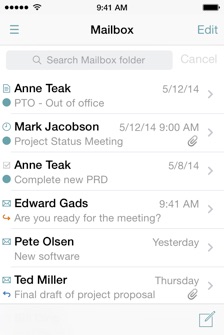
GW Mailbox is a GroupWise email and calendar app for the iPhone and iPad. With this app you get a much better interface than Novell delivers by default through GroupWise WebAccess. This app gives you some of the enterprise features that you wouldn't get with simple POP/IMAP - like access to your Frequent Contacts and GroupWise address book.
New Features!
• All new and improved iOS design
• Combined email, calendar and contacts access all in one app
• Uses iOS background processing to provide faster, more secure notifications
Key Features:
• View emails
• View items in your GroupWise mailbox and other folders, including shared folders
• View, delete, reply and forward messages
• Move items between folders
• Attached documents are viewable through the GroupWise document converter, or they can be downloaded to view with other apps on your device
Compose
• Compose new email, appointments, tasks and notes
• Add attachments to new emails
• Search your GroupWise address books to select contacts when composing an email
View calendar events
• View your GroupWise calendar with one tap in either day, week or month view
• View an item's properties to see if an appointment has been accepted, an email has been viewed, etc.
-
•Accept or decline appointments, tasks and notes
-
•Receive calendar notifications
View contacts
• Easily search all of your GroupWise address books including Frequent Contacts and your GroupWise System Address Book
• View a contact's details including phone number, email address and physical address
• One tap to use your iPhone to call a contact
• Email a contact using GW Mailbox or the iOS Mail app
• Create an appointment for a contact
New, advanced email notifications
• Better security
• Control how often mailbox is checked
• Banner notifications
Search in your folders
• Search in any of your GroupWise folders
Support

iOS: This app requires iOS 9
Devices: GW Mailbox works with your iPhone, iPod Touch or iPad, and requires an internet connection to work.
GroupWise: GW Mailbox has been tested to work with GroupWise 18, GroupWise 2014 R2, GroupWise 2014, GroupWise 2012, GroupWise 8, GroupWise 7 and GroupWise 6.5.



This app requires a subscription: $0.99 Monthly or $8.99 Annually
Payment will be charged to your iTunes account at confirmation of purchase.
The subscription automatically renews unless the auto-renew function is turned off at least 24-hours before the end of the current period.
No cancellation of the current subscription is allowed during the subscription period.
To change or cancel your subscription, view Apple’s document http://support.apple.com/kb/HT4098
View our Terms and Conditions at http://www.ghostpattern.com/Ghost_Pattern/Terms_And_Conditions.html
View our privacy policy at http://www.ghostpattern.com/Ghost_Pattern/Privacy.html
Please feel free to send us an email with any questions or comments that you may have. If you think you see a bug in the app, please send us an email! support@ghostpattern.com